Tired of maintaining WordPress? See your site rebuilt free.
Paste your address. We rebuild your homepage free from your live WordPress site, usually within hours, with zero plugins to manage.
Current site stays live
Keep your domain
No contract
How they compare
Mirin and WordPress, side by side.
Both put a small business online. The difference is whether you spend weekends wrestling templates or ask for changes in plain words.
How Mirin and WordPress compare for a small business website
Mirin
WordPress
See it before you pay
MirinYes, rebuilt free.We rebuild your homepage free from your current site and email it, usually within hours, so you see the work before paying.
WordPressDIY setup or developer build.WordPress.com offers a free ad supported subdomain to build yourself, while self hosted WordPress starts by picking a host, theme and plugins.
Day to day edits
MirinAsk, review, publish.Edit right on the page for free or ask in plain words, review the private draft, and press Publish without wrestling drag and drop boxes.
WordPressBlock editor and plugin menus.Edits happen inside the WordPress dashboard, page builder plugins and theme customizers, where updates can shift layouts.
How it is built
MirinBuilt from your site.Instead of starting from a blank template, Mirin rebuilds your homepage from what is already live and opens it in your workspace.
WordPressThemes and page builders.You install a theme and configure blocks or third party builder plugins; on WordPress.com, third party plugins start on the Business tier.
Solo owners and teams
MirinSolo or team plans.Pro fits one business with 3 seats, while Business adds staff pages, multiple locations and 5 seats.
WordPressUser roles across dashboards.WordPress supports multiple user logins and roles, though giving staff access often means teaching them the full admin dashboard.
Booking, forms and tools
MirinWorks with your tools.Link booking, checkout or forms to Calendly, Square, Acuity, Mindbody, Stripe or your own tool, alongside Mirin contact forms and chat.
WordPressPlugin ecosystem.Forms, booking and ecommerce rely on third party plugins or WooCommerce extensions that need separate licenses and updates.
Terms and ownership
MirinMonth to month.No contract and no setup fee, your domain stays in your own name, and you can cancel anytime.
WordPressHosting, plugins and renewals.WordPress.com bills monthly or annually with auto renewal (7 day monthly and 14 day annual refund windows), while self hosted sites bill hosting, themes and plugins separately.
Included day to day
MirinRun from one place.Contact forms with lead alerts, website chat, visitor insights and edge hosting on your own domain, managed from web or mobile.
WordPressCore CMS plus extensions.Strong blogging and content export out of the box; contact alerts, chat, analytics and backups usually require separate plugins or higher plans.
WordPress powers a huge share of the web and shines when you have a developer maintaining custom plugins, complex content types or heavy publishing workflows. Mirin is built for business owners who want their website handled cleanly without logging into a plugin dashboard or worrying that an update will break the homepage.
What this page says about WordPress comes from WordPress’s own website (WordPress.com’s pricing page, terms of service and domain and export documentation), read on November 22, 2026. Plans and terms change, so confirm theirs before you decide. WordPress is a trademark of its owner, and Mirin is not affiliated with it.
No drag and drop wrestling
Ask for the change. Live in seconds.
Write the update the way you would text a coworker, or click right on the page. Every change lands in a private draft first, and Publish puts it live without breaking your mobile layout.
Private draft until you publish
Every update stays in a draft only you can see. Check it on desktop and phone, then press Publish when it looks right.
Undo is always free
Try a new seasonal offer or move your booking button. If you prefer the earlier version, put it back anytime at no cost.
Clear costs, no surprises
Edits on the page are free. Edits by asking use the AI credits your plan includes, and Mirin shows the cost before anything runs.
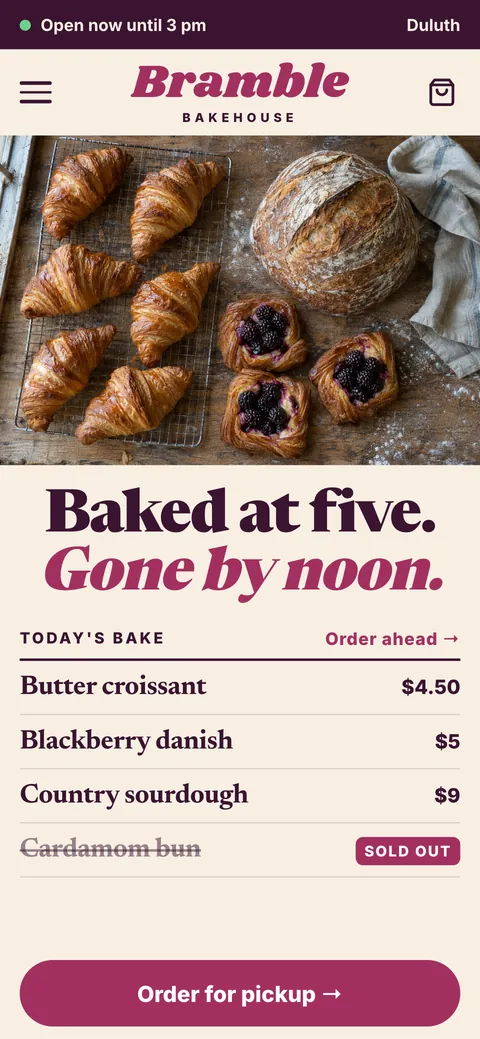
Mirin’s workspace for Bramble Bakehouse. The owner asks for three changes in plain words, and each one appears in the draft.
Bramble BakehouseDraftPublish
Add our Saturday morning pastry box right at the top of the menu.
Done. It is in your draft.
Morning menuSaturday morning pastry box, preorder by FridayNew
UndoView on page
Update our weekday hours to 7 AM to 4 PM on the homepage and footer.
Done. It is in your draft.
Monday through Friday8 AM to 3 PM7 AM to 4 PMMenuOpen 7 AM to 4 PMUpdatedContact
UndoView on page
Move the catering request button right under the main headline.
Done. It is in your draft.
Baked fresh every morning in Portland.Request catering for your eventMoved
UndoView on page
Ask for a change
Solo or multi location
One storefront or a growing team. Built for how you work.
Whether you run the shop yourself or manage several locations and staff, your site stays simple to update from your desk or phone.
Pro$99 a monthOne person, one location. Month to month.
One location
Your services, hours and next step clear on the first screen
Booking, quote and order links wired straight to the tools you already use
Quick edits in plain words or right on the page without fighting blocks
Contact forms with lead alerts, website chat and visitor insights
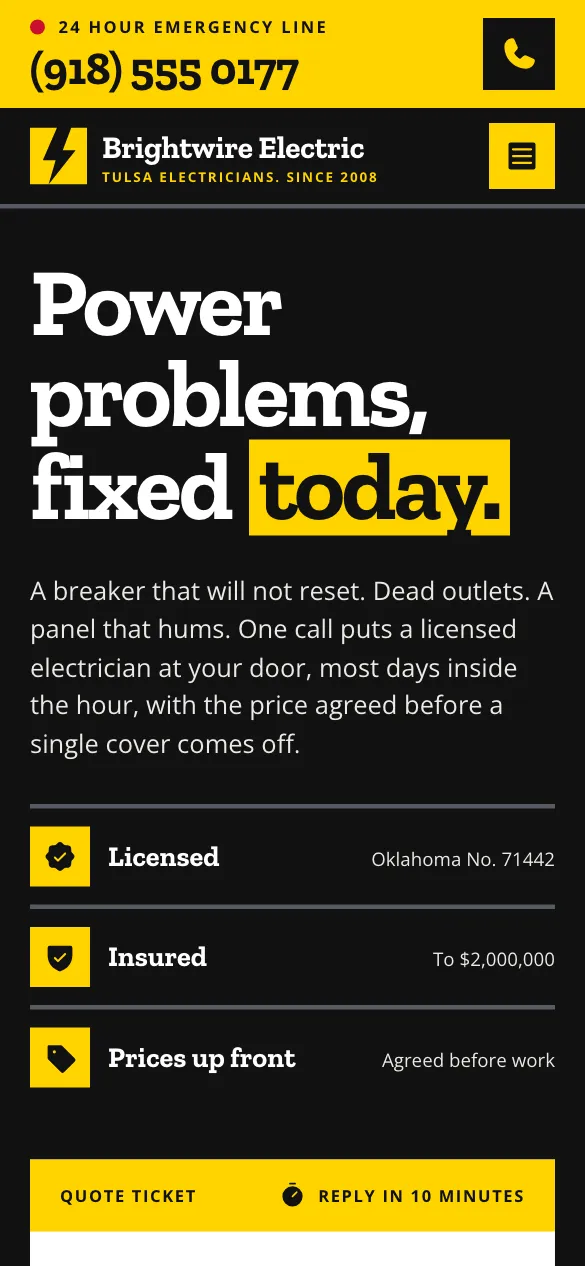
Brightwire ElectricPanel upgrades, EV chargers and residential repairsServing Greater Portland, licensed and insuredSame week estimates. Emergency calls answered Monday through Saturday.Request an estimateSends straight to your inbox
Business$199 a monthTwo or more people, or more than one location. Month to month.
Multi location or team
Team and staff profile pages with individual roles or services
Multiple locations, each with its own address, hours and contact details
Fast seasonal updates published across every page in seconds
Separate logins for managers and staff, with 5 seats
Locations and hoursUpdated live from web or mobile
North End BakeryDaily pastries, coffee bar and pickup counterOpen 7 AM to 4 PM
Harbor Market StallSourdough loaves and seasonal fruit galettesSat and Sun
Catering KitchenOffice breakfasts, weddings and private eventsBooking ahead
Plain answers
Five worries owners raise before leaving WordPress.
The real reasons business owners put off leaving a DIY builder, answered plainly without sales talk.
01
If I leave WordPress, can I still update pages myself without breaking plugins?
Yes. You never have to touch plugin updates, theme conflicts or page builder shortcodes again. Click right on the page to edit words or photos for free, or type what you want changed in plain words from your computer or phone.
Every update opens in a private draft first, undo is always free, and pressing Publish puts your change live in seconds.
Plain wordsUpdate Saturday hours to 9 AM to 3 PMDraft ready
yourbusiness.comPublished in secondsDesktop and phone stay aligned. Free undo anytime.
No drag and drop boxes to realign on mobile.
02
Will my website go down when I move off WordPress? Do I keep my domain?
Your WordPress website stays live while you review and refine your rebuilt Mirin homepage in a private draft. Switching takes one change in your domain settings, and Mirin checks every five minutes until the new site is ready.
Whether your domain sits with Namecheap, Cloudflare, GoDaddy or WordPress.com, you own it and keep it in your own name. Cancel your WordPress hosting only after your Mirin site is live.
Domain settings for yourbusiness.com
WebsiteWordPressMirin
One change. Mirin checks it every five minutes until it is ready.
03
Will moving off WordPress hurt my Google rankings or existing page URLs?
Because your domain name stays the same, every link pointing to your site from Google Business Profile, local directories and referral partners keeps working untouched.
Mirin preserves your main page addresses, gives every page its own search title and description, and sets permanent redirects for any page that changes address. Mirin never promises a search ranking, but fast static pages, clean URLs and redirects protect the search history you already earned.
yourbusiness.com/servicesLocal services in PortlandThe same address, title and description as before.
Google Business Profile still opens yourbusiness.com
Moved pages send visitors to their new address
04
What happens to my business email when I leave my WordPress host?
If your email runs on Google Workspace or Microsoft 365, pointing your website to Mirin leaves your email records completely untouched.
If your email mailboxes currently live on the same web host as your WordPress server (such as cPanel webmail), move your email to Google Workspace or Microsoft 365 before canceling that web host so your inbox never pauses.
yourbusiness.com
WebsiteMoves to Mirin
EmailGoogle Workspace or Microsoft 365Untouched
05
My WordPress site has years of clutter. How much work is switching?
You do not have to untangle old plugins or export XML files to see a better homepage. Paste your live WordPress address and Mirin rebuilds your homepage free from what visitors see today, usually within hours.
Review your draft whenever you have a few minutes, ask for any tweak in plain words, and switch when you are ready.
yourbusiness.comSee the redesign
About a minute
MirinYour new homepage is readyUsually within hours
How switching works
Switch at your own pace. Your site stays live.
Your WordPress website stays online through every step until your Mirin site is live on your own domain.
yourbusiness.com
Brightwire Electric
Welcome to Brightwire Electric
Contact Us
Address copied
1WordPress site live
Paste your website address
Free, and about a minute. Your WordPress site is untouched.
Inbox
Search mail
Mirinnow
Your new homepage is ready
We designed it for Brightwire Electric. Open it now and ask for any change in plain words.
SupplierTue
Order confirmation
Your Thursday delivery is scheduled.
BookkeeperMon
Monthly summary ready
Statements for last month are uploaded.
Property officeFri
Parking lot striping
South stalls reopen Monday morning.
Customer noteTue
Saturday availability
Checking whether you have morning openings.
2Still live
Review your new homepage
It arrives by email, usually within hours, and opens in your private draft. Ask for any change in plain words.
Brightwire ElectricDraft
Update Saturday hours to 9 AM to 3 PM and put the quote button at the top.
Done. Saturday hours are updated and the quote button sits under your headline. It is in your draft.
Ask for a change
3Still live
Connect your tools
Point your buttons at Calendly, Square, Stripe or your own scheduler, and turn on Mirin forms and chat.
yourbusiness.com
4Mirin site live
Point your domain, then cancel
Update your domain settings. Mirin checks every five minutes until it is ready, and only then do you cancel WordPress.
What Mirin costs
No setup fee. No contract. Pay only when you switch.
Your website redesign is free. Put it online free, or choose a plan for your own domain.
Price
Who it is for
Address
Includes
Free
To see it and keep it online
Price
$0
Who it is for
A real website, online today.
Address
yourbusiness.mymirin.com
Includes
One website at a Mirin address
Up to 3 pages, shared by link
Made with Mirin on every page
Pro
One business on its own domain
Price
$99 a month
Who it is for
One person, one location. Month to month.
Address
yourbusiness.com
Includes
Unlimited pages
Your own domain
50 monthly AI credits
Visual editor, no code
Business
A team or multi location business
Price
$199 a month
Who it is for
Two or more people, or more than one location. Month to month.
Address
yourteam.com
Includes
Everything in Pro, plus
Staff profile pages
Multiple locations
200 monthly AI credits
5 seats
Start with a free rebuilt homepage. Paid plans are month to month, cancel anytime, and your domain always stays in your name.
Have another question about switching or your domain setup? Open the chat and ask us directly.
Will my Google Business Profile and local links still open my site?
Yes. Your Google Business Profile, social links and directories point to your domain name, not to WordPress. Once your domain points to Mirin, visitors land straight on your rebuilt site.
Can I leave WordPress in the middle of my hosting plan?
You can start your free Mirin homepage any day, and Mirin paid plans run month to month with no contract. Check your current WordPress.com or web host renewal date before canceling: WordPress.com auto renews until canceled in Active Upgrades, with 7 day monthly and 14 day annual refund windows.
What if WordPress.com registered my domain for me?
You keep ownership of a domain registered at WordPress.com. You can point its DNS settings to Mirin immediately or unlock and transfer it to another registrar once it passes the standard 60 day ICANN transfer window.
Can my office manager update hours and services without learning WordPress?
Yes. Instead of training staff on wp admin menus and page builder plugins, give them their own Mirin login to edit in plain words or right on the page, reviewed in a private draft first. Pro includes 3 seats and Business includes 5 seats.
How long does switching from WordPress to Mirin take?
Your rebuilt homepage arrives by email, usually within hours. Refine your private draft at your own pace, update your domain settings once it looks right, and Mirin checks every five minutes until it is live.
Do I really pay nothing upfront to see my rebuilt homepage?
Yes. Rather than paying a freelancer to fix or rebuild your WordPress theme first, Mirin rebuilds your homepage free from your current site so you can judge the work in your workspace. You only pay when you pick Pro or Business to connect your own domain.
Your turn
Keep WordPress live. Decide after you see it.
Paste your website address. We rebuild your homepage free from your current site and email it, usually within hours.